
Creating a contact form in WordPress is one of the most important steps when building a professional website. Whether you run a business site, blog, portfolio, agency website, or eCommerce store, a contact form allows visitors to communicate with you quickly, safely, and efficiently.
In 2026, building a contact form in WordPress is easier than ever. With powerful drag-and-drop plugins, improved spam protection, and seamless integrations, you can create a fully functional form in minutes — without writing a single line of code.
________________________________________
Table of Contents
Why Every Website Needs a Contact Form
Contact Form vs Email Address – What’s Better?
Choosing the Right WordPress Contact Form Plugin
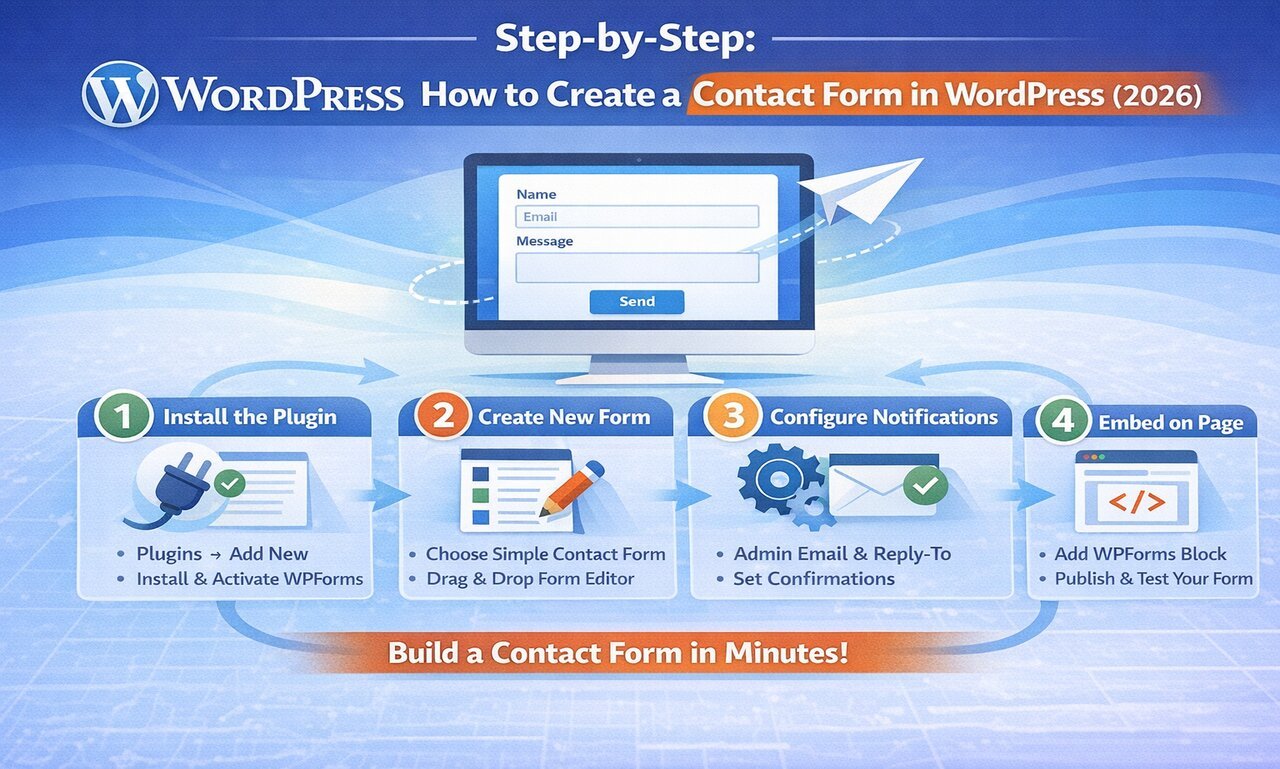
Step-by-Step: How to Create a Contact Form
Configuring Email Notifications Properly
Adding Spam Protection (Essential in 2026)
Embedding Your Contact Form on a Page
Styling and Customising Your Form
Advanced Features You Can Add
Fixing Common Contact Form Problems
Best Practices for High-Converting Forms
Final Thoughts
________________________________________
1. Why Every Website Needs a Contact Form
In the digital age, a website serves as your business’s virtual storefront, information hub, or creative portfolio. But what’s a store without a way for customers to talk to you? That’s where the humble, yet essential, contact form comes in. Often overlooked, a well-implemented contact form can be a powerful tool for communication, customer service, and even business growth.
Here’s why every website, regardless of its purpose, absolutely needs a contact form:
-
Professionalism and Credibility
Having a dedicated contact form instantly elevates your website’s professional appearance. It signals to visitors that you are accessible and serious about your online presence. It creates an impression of trustworthiness and reliability, which is crucial for building rapport with potential clients or customers.
2. Streamlined Communication
Email addresses are great, but a contact form streamlines the communication process significantly. Instead of visitors having to open their email client, copy your address, and then compose a message, a form provides a direct and immediate channel. This reduces friction and encourages more people to reach out.
3. Organized Information Gathering
Contact forms allow you to dictate what information you need from your visitors. You can include specific fields for names, email addresses, phone numbers, and even categories for their inquiries (e.g., “Sales,” “Support,” “General Inquiry”). This pre-organization helps you filter and prioritize messages, making your workflow more efficient.
4. Reduced Spams
Displaying your email address directly on your website is an open invitation for spam bots. These automated programs crawl the internet harvesting email addresses, leading to an inbox full of junk mail. A contact form acts as a barrier, protecting your email from these unwanted solicitations while still allowing legitimate inquiries to come through.
5. Improved User Experience
A contact form is user-friendly. It provides a clear call to action and guides the user through the process of sending a message. This can be particularly helpful for those who are less tech-savvy or prefer not to use their personal email accounts for business inquiries. A smooth and intuitive contact process contributes to a positive overall user experience.
6. Lead Generation and Business Growth
For businesses, a contact form is a vital lead generation tool. It’s the mechanism through which potential customers can express interest in your products or services, request quotes, or ask for more information. By making it easy for leads to connect, you increase your chances of converting them into paying customers.
- Customer Support and Feedback
Beyond sales, contact forms are excellent for customer support. Customers can easily report issues, ask questions about products, or provide valuable feedback. This direct line of communication helps you understand your audience better, address concerns promptly, and continuously improve your offerings.
- Analytics and Insights
Many contact form plugins and services offer analytics that can provide valuable insights. You can track how many submissions you receive, which pages are generating the most inquiries, and even identify common questions or issues. This data can inform your content strategy, improve your FAQs, and optimize your website.
- Accessibility and Convenience
A contact form is accessible from any device with an internet connection, making it convenient for visitors to reach you whether they’re on a desktop, tablet, or smartphone. This omnipresent availability ensures that you never miss a potential opportunity for connection.
________________________________________
2. Contact Form vs Displaying Your Email Address
Some website owners simply add their email address to the contact page. While that may seem simple, it creates several issues:
Problems with Displaying Email Publicly
Spam bots scrape your email
Inbox overload
No structured information
Hard to track enquiries
Unprofessional appearance
Why a Contact Form is Better
Prevents spam
Lets you control required fields
Allows file uploads
Enables automation
Integrates with CRM & email marketing tools
In 2026, a contact form is the professional standard.
________________________________________
3. Choosing the Right WordPress Contact Form Plugin
WordPress does not include a built-in contact form feature, so you need a plugin.
Here are the most popular contact form plugins in 2026:
________________________________________
1️⃣ WPForms
Best for beginners
Features:
Drag-and-drop builder
Pre-built templates
Spam protection
Conditional logic (Pro)
File uploads
Email integrations
Very user-friendly and ideal for small businesses.
________________________________________
2️⃣ Contact Form 7
Best free lightweight option
Features:
Completely free
Customisable
Developer-friendly
Requires basic understanding of shortcodes
Good for simple websites.
________________________________________
3️⃣ Gravity Forms
Best for advanced users
Features:
Complex form logic
Payment integrations
Advanced calculations
CRM integration
Perfect for agencies and large businesses.
________________________________________
4️⃣ Fluent Forms
Fast and modern
Features:
Lightweight
Conditional logic
Multi-step forms
Affordable premium plans
________________________________________
Which Plugin Should You Choose?
For beginners → WPForms
For developers → Contact Form 7
For complex systems → Gravity Forms
For balance → Fluent Forms
For this tutorial, we’ll use WPForms as the example because it’s easiest for most users.
________________________________________
4. How to Create a Contact Form in WordPress (2026)
Now let’s build your form.
________________________________________
Step 1: Install the Plugin
Log into your WordPress dashboard
Go to Plugins → Add New
Search for “WPForms”
Click Install Now
Click Activate
The plugin is now ready.
________________________________________
Step 2: Create a New Form
Go to WPForms → Add New
Enter a form name (e.g., Contact Us)
Choose “Simple Contact Form” template
The drag-and-drop builder will open.
________________________________________
Step 3: Customise Your Fields
By default, you’ll see:
Name
Comment/Message
You can add:
Phone number
Subject dropdown
File upload
Website field
Checkboxes
GDPR consent
Simply drag new fields from the left panel.
________________________________________
Step 4: Configure Field Settings
Click on any field to edit:
Label
Required option
Placeholder text
Field size
Custom CSS classes
Make essential fields required.
________________________________________
5.Configure Email Notifications Properly
This is one of the most important steps.
Go to Settings → Notifications
Make sure:
“Send To Email Address” is your admin email
“From Name” is your website name
“Reply-To” is set to the user’s email field
If Reply-To isn’t set correctly, you won’t be able to respond directly.
________________________________________
Set Confirmation Message
Go to Settings → Confirmations
Choose:
Show success message
Redirect to thank-you page
Redirect to custom URL
Example message:
“Thank you for contacting us. We’ll respond within 24 hours.”
Click Save.
________________________________________
6. Add Spam Protection (Very Important in 2026)
Spam is a big issue in 2026.
Enable Google reCAPTCHA
Go to WPForms → Settings → CAPTCHA
Choose reCAPTCHA v2 or v3
Enter site key & secret key
Save settings
You can also enable:
Honeypot protection
Cloudflare Turnstile
hCaptcha
Without spam protection, your inbox will be flooded.
________________________________________
7. Embed the Contact Form on Your Website
There are two ways:
________________________________________
Method 1: Block Editor (Recommended)
Go to Pages → Add New
Add “WPForms” block
Select your form
Click Publish
Done!
________________________________________
Method 2: Shortcode
Copy shortcode:
[wpforms id=”123″]
Paste it into any page.
Publish the page.
________________________________________
8. Styling and Customising Your Form
A plain form works, but design improves conversions.
Ways to Style:
Use theme styling
Adjust form field sizes
Add CSS
Use page builder (Elementor, etc.)
Change button colour
Example CSS:
.wpforms-submit {
background-color: #0073e6;
border-radius: 6px;
}
Make sure your form matches your brand.
________________________________________
9. Advanced Features You Can Add
Modern contact forms can do much more.
Multi-Step Forms
Break long forms into steps for better user experience.
Conditional Logic
Show fields only if certain options are selected.
Example:
If “Service Inquiry” selected → Show budget field.
File Uploads
Allow users to upload:
Documents
Images
CVs
Email Marketing Integration
Connect with:
Mailchimp
HubSpot
ConvertKit
Automatically add users to mailing lists.
Payment Integration
Accept payments via:
Stripe
PayPal
Turn your contact form into a booking or order form.
________________________________________
10. Fixing Common Contact Form Problems
Problem: Not Receiving Emails
Solution:
Install SMTP plugin
Use WP Mail SMTP
Connect with Gmail or SMTP server
Problem: Too Much Spam
Solution:
Enable reCAPTCHA
Enable Honeypot
Add Cloudflare protection
Problem: Form Not Displaying
Solution:
Clear cache
Disable conflicting plugins
Check theme compatibility
Problem: Form Looks Broken
Solution:
Inspect CSS conflicts
Check page builder settings
________________________________________
11. Best Practices for High-Converting Contact Forms
Keep It Simple
Don’t ask unnecessary questions.
Make Fields Clear
Use clear labels and placeholders.
Add Trust Signals
Phone number
Business address
Privacy policy link
Add Response Time
Example:
“We respond within 24 hours.”
Make Button Strong
Instead of “Submit” use:
Send Message
Get Free Quote
Contact Our Team
________________________________________
12. Contact Form SEO Tips
Your contact page can rank in search engines.
Optimise:
Title tag
Meta description
URL structure
Internal links
Schema markup
Example SEO Title: “How to Create a WordPress Contact Form Easily (2026 Guide)”
________________________________________
13. Security Tips for WordPress Forms
Security is critical.
Always:
Keep WordPress updated
Keep plugins updated
Use HTTPS
Install security plugin
Limit file upload size
Validate required fields
Never ignore security.
________________________________________
14. Mobile Optimisation
One of the biggest advantages of modern form builders like WPForms is that they are inherently responsive. This means the form fields and layout will automatically adjust to fit different screen sizes, from large desktops to small smartphones.
However, here are additional tips for optimal mobile experience in 2026:
- Field Sizing: While WPForms makes fields responsive, consider setting fields like “Name” and “Email” to “Large” in the field options. This provides a bigger target for mobile users to tap with their fingers.
- Minimize Fields: On mobile, fewer fields mean less scrolling and a faster completion time. Only ask for absolutely essential information.
- Clear Labels: Ensure field labels are clear and visible. Avoid relying solely on placeholder text, as it disappears once the user starts typing.
- Contrast and Readability: Use a theme with good contrast between text and background. Text should be large enough to read easily without zooming.
- Test, Test, Test:
- Browser Developer Tools: Use your web browser’s developer tools (usually F12) to simulate different mobile devices and screen sizes.
- Actual Devices: Most importantly, test your form on a real smartphone and tablet. Fill it out yourself. Does it feel intuitive? Are the buttons easy to tap? Is the keyboard appearing correctly for different field types?
________________________________________
15. Creating a Professional Contact Page Layout
A “Contact Us” page is often the most visited page on a website, yet it’s frequently the most neglected. In 2026, users expect more than just a wall of text and a lonely email address. A professional contact page acts as a bridge between a visitor’s curiosity and a lasting business relationship.
Here is how to design a professional layout that converts visitors into leads.
- The Anatomy of a High-Converting Layout
A professional contact page should be clean, intuitive, and provide multiple ways to reach you. The most effective layouts typically follow a split-screen or modular grid approach:
- The Primary Action (Left/Center): This is usually your contact form. It should be the focal point of the page.
- The Contextual Info (Right/Sidebar): This includes your physical address, phone number, and social media links.
- The Visual Element: A map (if you have a physical location) or a high-quality team photo to humanize the brand.
- Essential Elements to Include
To maintain professionalism and build trust, ensure your layout includes these four pillars:
- The “Why” and “When”
Don’t just say “Contact Us.” Give people a reason. Use a friendly headline like “Let’s build something great together” and clearly state your office hours and expected response time (e.g., “We typically respond within 24 hours”).
2. The Minimalist Form
The more fields you have, the lower your conversion rate. Stick to the essentials:
- Name
- Email Address
- Subject (a dropdown menu helps categorize inquiries)
- Message
- Direct Contact Information
Some people hate forms. Provide an alternative:
- Click-to-call phone numbers for mobile users.
- Copy-to-clipboard email addresses.
- Physical Address with an embedded Google Map.
- Social Proof & Links
If someone isn’t ready to message you yet, give them a way to follow your journey. Include icons for LinkedIn, X (formerly Twitter), or Instagram.
- Design Principles for 2026
To stand out in today’s digital landscape, your contact page must adhere to modern design standards:
| Feature | Best Practice | Why it Matters |
| Mobile-First | Single-column stacks for forms. | Ensures usability on 70% of devices. |
| Accessibility | High contrast and ARIA labels. | Makes your site usable for everyone. |
| Micro-Interactions | Buttons that change color on hover. | Provides visual feedback that the site is “alive.” |
| Clean Space | Ample white space around fields. | Reduces cognitive load and looks premium. |
- Where to Place the Page?
Accessibility is key. Your contact page link should be easily found in two places:
- The Main Navigation: Usually the last item on the right.
- The Footer: A standard location where users look when they are lost.
________________________________________
Final Thoughts
Creating a WordPress contact form in 2026 is simple, fast, and beginner-friendly.
With tools like WPForms, Contact Form 7, Gravity Forms, and Fluent Forms, you can build powerful forms without coding knowledge.
The process is straightforward:
Install plugin
Create form
Configure notifications
Add spam protection
Embed on page
Test thoroughly
A well-built contact form increases trust, improves user experience, and generates more leads.
If you don’t already have one — now is the time to create your WordPress contact form and start converting visitors into real enquiries.